PlatformIO Remote Agent setup
PlatformIO’s Remote Agent lets you run PlatformIO commands against boards attached to another computer — for example a Raspberry Pi — without being physically present at it. Flashing a microcontroller through a Pi is often more reliable than flashing it directly from a PC, and it means the controller never needs to be connected to the PC itself.
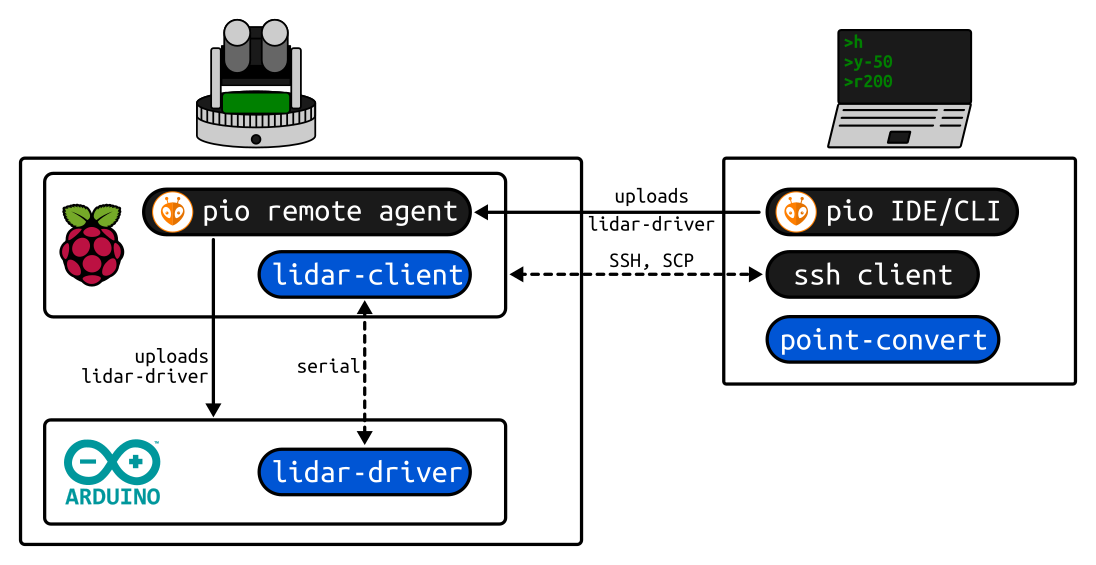
Prerequisites
- A Raspberry Pi running Raspberry Pi OS 32-bit.
- A PC with the PlatformIO Core CLI (or IDE) installed.
Steps
1. Update the Raspberry Pi
sudo apt-get update && sudo apt-get upgrade -y && sudo apt-get dist-upgrade && sudo apt-get autoremove -y2. Install required packages
sudo apt install python3 python3-pip libffi-dev libssl-dev -y3. Install PlatformIO and the Remote Agent
Do not run this as root — otherwise the resulting service won’t be able to compile afterwards.
sudo pip3 install platformio
pio remote agent
pio account login
4. Create a systemd service for the agent
sudo nano /etc/systemd/system/pio-remote.service[Unit]
Description=pio remote agent
Requires=network-online.target
After=network-online.target
[Service]
Type=simple
User=<user>
WorkingDirectory=/home/<user>
ExecStart=/usr/local/bin/platformio remote agent start
Restart=always
[Install]
WantedBy=multi-user.target5. Enable and start the service
sudo systemctl enable pio-remote
sudo systemctl start pio-remote
Verify
systemctl status pio-remoteIf something goes wrong, check the agent’s own log:
journalctl -e -t platformioFrom the PC, pio remote agent list (after pio account login with the same account) should show
the Pi as an available remote agent, and pio remote run / pio remote device monitor should
reach boards attached to it.
Troubleshooting
- Compilation fails on the Pi after installing as root: reinstall PlatformIO as a normal user — the remote agent service needs to compile under that user’s environment.