Reducing swap usage on a hypervisor host to protect SSD lifespan
The Linux kernel’s default vm.swappiness (60 on most distributions) makes the kernel start
swapping out fairly aggressively, well before physical memory is actually exhausted. On a
hypervisor host with plenty of RAM, this can mean noticeable and unnecessary swap-to-SSD write
traffic — which shortens SSD lifespan over time for no real benefit.
How it works
vm.swappiness is a 0–100 kernel tunable controlling how aggressively the kernel prefers to swap
out anonymous memory pages versus reclaiming page cache:
vm.swappiness=0— swap only when physical memory is nearly exhausted.vm.swappiness=10— swap once free memory drops to roughly 10%.vm.swappiness=60(typical default) — swaps considerably earlier and more readily.
Steps
1. Check the current value
cat /proc/sys/vm/swappiness2. Set a new value
sysctl vm.swappiness=0Use 0 to swap only under real memory pressure, or a low value like 10 for a small safety
margin. Make it persistent across reboots by adding it to /etc/sysctl.conf or a file under
/etc/sysctl.d/:
vm.swappiness=0
3. Clear out existing swap usage (optional)
Applying the new swappiness value doesn’t undo memory already swapped out. To force everything
back into RAM immediately:
swapoff -a   # can take several minutes on hosts with a lot of swapped data
swapon -a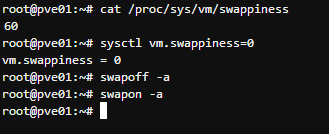
Verify
cat /proc/sys/vm/swappinessTroubleshooting
swapoff -aseems to hang: it can legitimately take on the order of 10–15 minutes on a host with a large amount of data currently in swap, since every swapped page has to be paged back into RAM before the swap area can be released — this is expected, not a fault.
Related
- Removing the Proxmox VE subscription notice — another small generic Proxmox VE host tweak from the same source.
- Debian — another small generic Proxmox VE host tweak.